
- "How can I generate a report showing which vessels are currently in which spaces, along with customer and vessel details?"
Resolution Steps
- Go to Reports.
- Select Reservation and Spaces.
- Click on Current Dockage.
- Choose the Start Date and End Date you want to review.
- Apply optional filters as needed:
- Show only checked-in reservations or only reservations.
- Include unoccupied spaces to view which spaces are empty.
- Include the customer’s email address.
- Display registration expiration date.
- Display insurance expiration date.
- Show reservation current balance.
- Display the whole ID.
- Show rate details.
- Show space amount validation.
- Click Run Report.
- The report will display:
- Which vessels are in which spaces.
- Customer and vessel details.
- Arrival and departure dates.
- Vessel dimensions.
- Customer phone number for contact.
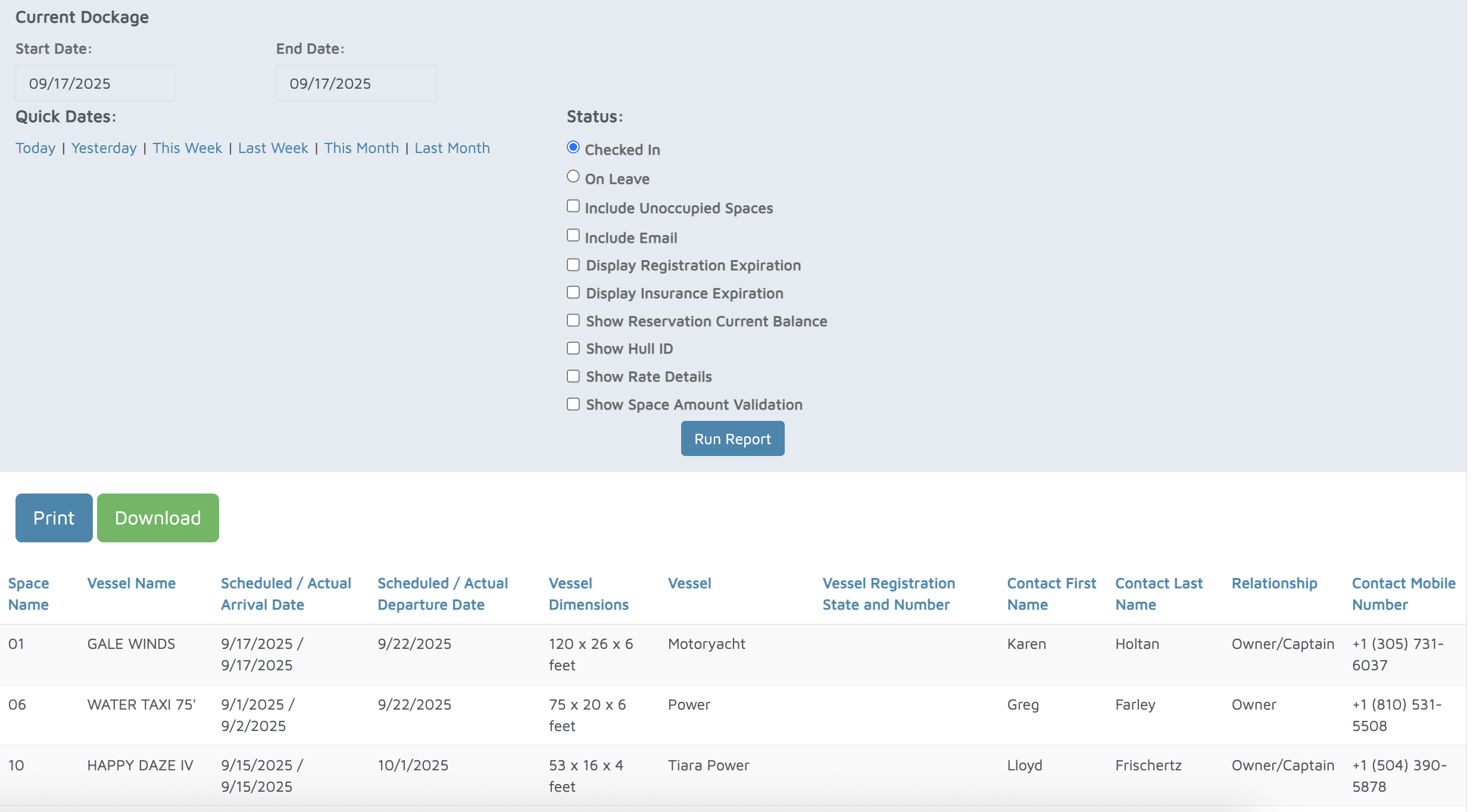
Verification: The report will populate all reservations that were 'checked in' within the time frame of the dates selected.