
- "What is the Transaction by User report used for?"
- "Do I have a way to see who processed a transaction in my software?"
Resolution Steps
- Go to Reports → Invoicing & Payments.
- Click Transactions by User.
- Enter the start date and end date for the period you want to review.
- Click Run Report to generate grouped results.
- Review Report Results. For each staff user, the report will display:
- User Name – staff member who processed the transaction.
- Payment Method – breakdown of cash, check, or credit card transactions.
- Payment Amounts – totals of all payments processed by that user.
- Refunds Processed – amounts refunded by the user (shown in a dedicated column).
- User Totals – the sum of payments and refunds per user.
- Grand Total – cumulative totals across all users.
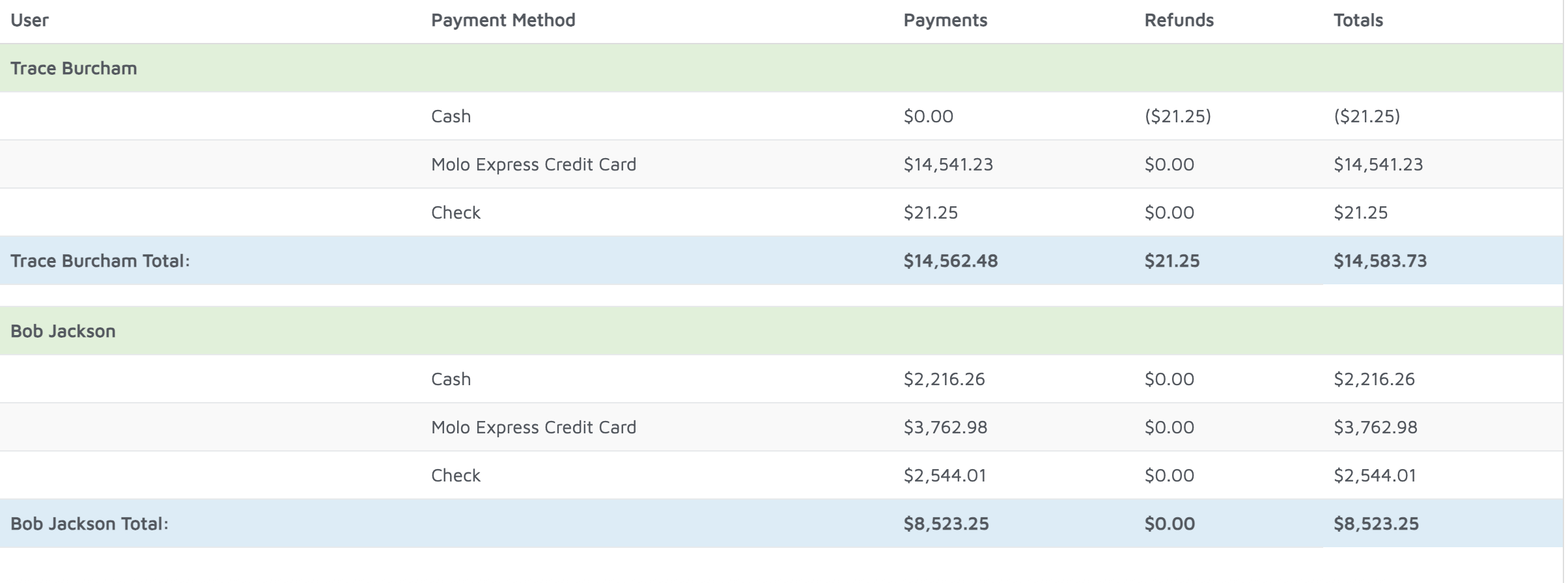
Verification: Use this report to track payments processed by each user.