
- "How do I generate a Multi-Occupancy Dockage Detail report to review dock usage by long edge and reservation details?"
Resolution Steps
- Go to Reports.
- Select Reservation and Spaces.
- Click on Multi-Occupancy Dockage Detail.
- Enter the Date Range you want to review.
- Apply optional filters:
- Include "Do Not Count" spaces.
- Show notes from reservations.
- Display which reservations are online bookings (and their notes).
- Include checked-out reservations.
- Specify which long edge spaces to review.
- Click Run Report.
- The report will display:
- Each day within the selected date range.
- Total footage available for each long edge.
- Footage occupied and percentage occupied.
- Footage available and percentage available.
- Reservations occupying each space, including:
- Arrival and departure dates
- Vessel details
- Amount of space (in feet) used per vessel
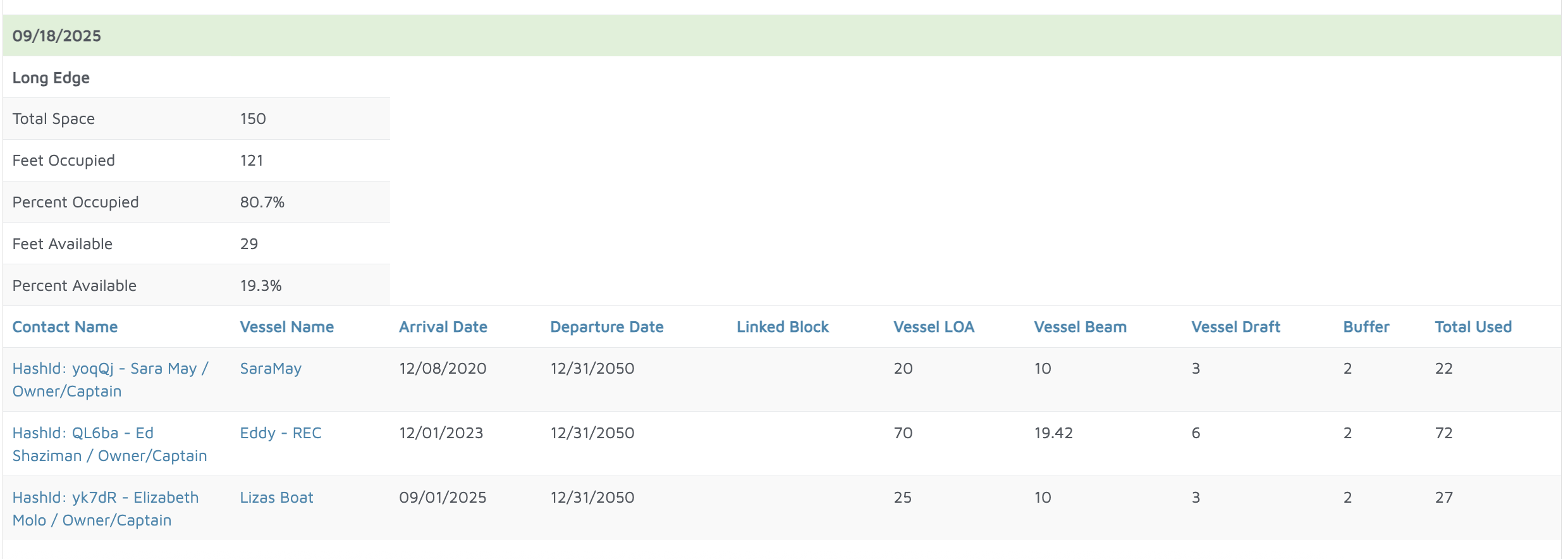
Verification: The report will populate all reservations that were placed in the long edge spaces.