
- "I'm trying to refund a customer's card, but I can't find the transaction in the prior transactions list."
Important Information
- The Refund Prior Transaction screen only appears if the invoice was previously paid using a credit card and the user wants to issue a credit card refund.
- Payments older than 1 month won't appear by default in the Refund Prior Transactions list.
Resolution Steps
To view transactions older than 1 month:
- Open an invoice that shows the Payment as a line item.
- Click Refund to enter Refund mode.
- Click Credit Card. The Refund Prior Transaction pop-up will appear.
- Enter the Invoice ID in the search box.
- Click Search.
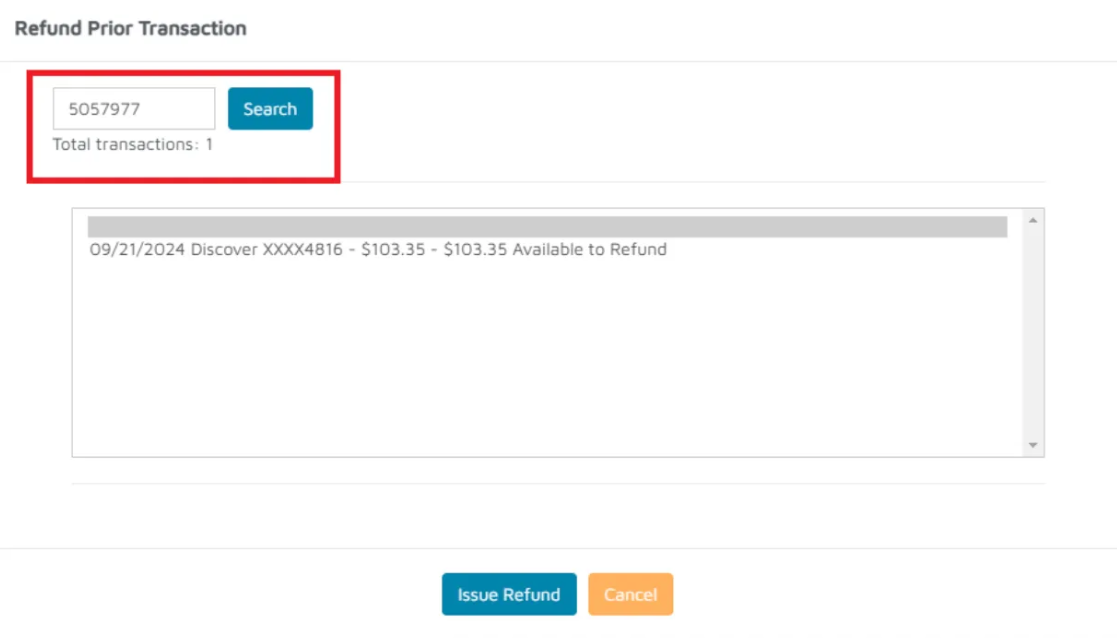
- Select the credit card payment available to refund.
- Click Issue Refund.
Verification: The transaction can be found, and a refund can be issued.