
- "How do I delete an item in an invoice?"
- "How do I discount an item?"
- "How do I void an Item?"
Resolution Steps
- Open an existing invoice. For steps, refer to How to Open an Invoice.
- Click the Pencil icon
 to modify the item, then select the desired action on the dropdown menu:
Note: If there is no Pencil icon, the invoice may be locked. Refer to How to Manage an Invoice with a Lock Date.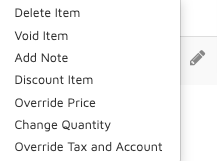
- Delete Item: Remove the item from the invoice.
- Void Item: Voiding an item adds a new line with a negative (-) charge, reversing the original charge while keeping the item visible on the invoice.
- Add Note: Add a note that will be displayed on the invoice.
- Discount Item: Discounts can be applied by Percentage, Quantity, or dollar amount (Cash). To remove an existing discount, set the amount to '0' and the unit to 'Cash'.
- Override Price: Override the price of an item.
- Change Quantity: Change the quantity of the item.
- Override Tax and Account: Override the tax and account of an item.
- Click Save to Account.
Verification/Confirmation: The invoice will have the desired modifications after saving changes.