
- "We have a new employee. How can we add a new user?"
- "How can we add a new user to our marina?"
Resolution Steps
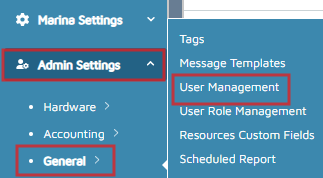
- On the left menu, navigate to Admin Settings > General > User Management.
- On the right-hand side, click on New.
- Complete the following:
- Email Address: This will be the User ID to log in.
- First Name
- Last Name
- User Role: The User Role controls the level of access for the user.
- User Type: For companies with one marina, select Single Marina User. If this is for a company with multiple marinas, select Company User to give access to all the company's marinas.
- Primary Marina: (Optional) Only applies for companies with multiple marinas.
- Click Done.
Verification/Confirmation: When the New user is created, a "New User Created" message appears on the screen.