
- "How do I generate the Current Inventory report, and what options does it provide?"
Resolution Steps
- Go to Reports.
- Select Inventory.
- Click on Current Inventory.
- Set the Inventory Date:
- This determines the date you want to view quantities on hand or settings for that day.
- Apply filters as needed:
- Category – filter by inventory category.
- Subcategory – refine results further.
- Show Location – displays locations for tracked inventory items.
- Only Tracked Items – limits results to items with tracking enabled.
- Currently In Stock – only shows items currently in stock (hides out-of-stock items).
- Click Run Report.
- Review the results:
- Displays all items in inventory (services, parts, fees, charges).
- Shows the settings configured for each inventory item.
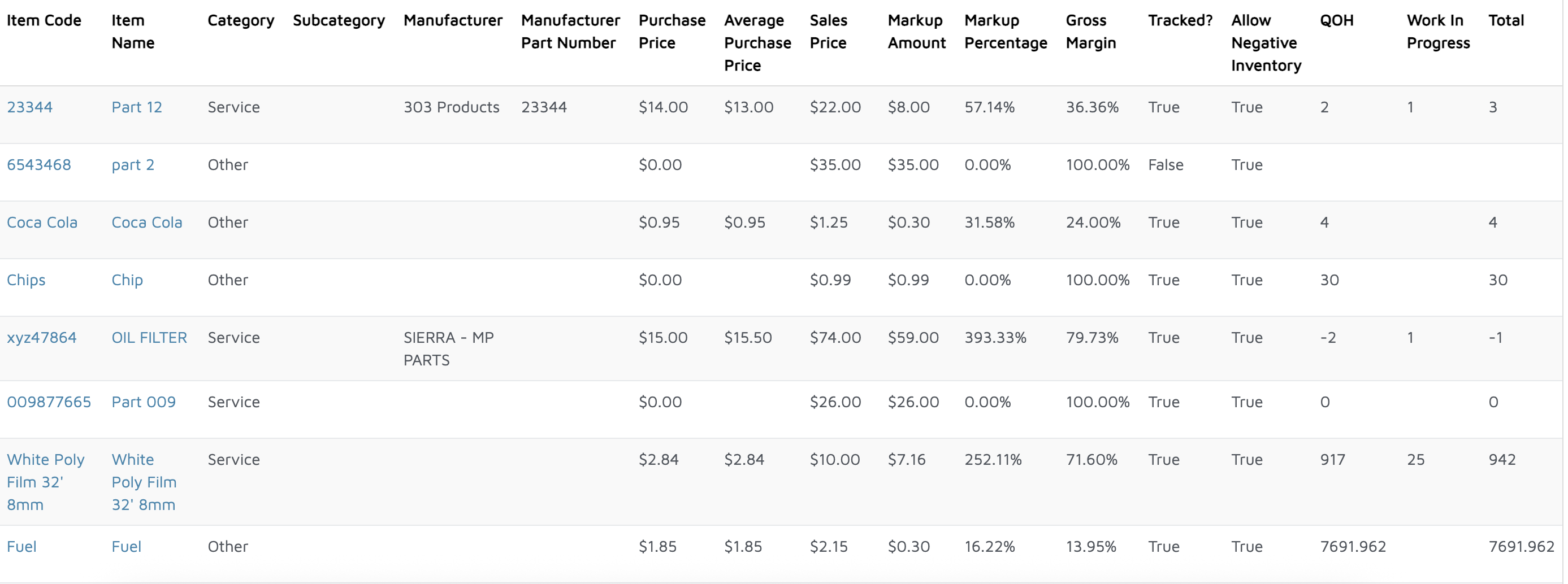
Verification: The report will populate with everything from the Inventory section of Molo.