Understanding Stripe Deposit Adjustments Within a Batch Window
Print
Modified on: Mon, 22 Dec, 2025 at 2:36 PM
- "Why does my Stripe batch show an adjustment, and how does Molo determine the adjustment amount?"
Resolution Steps
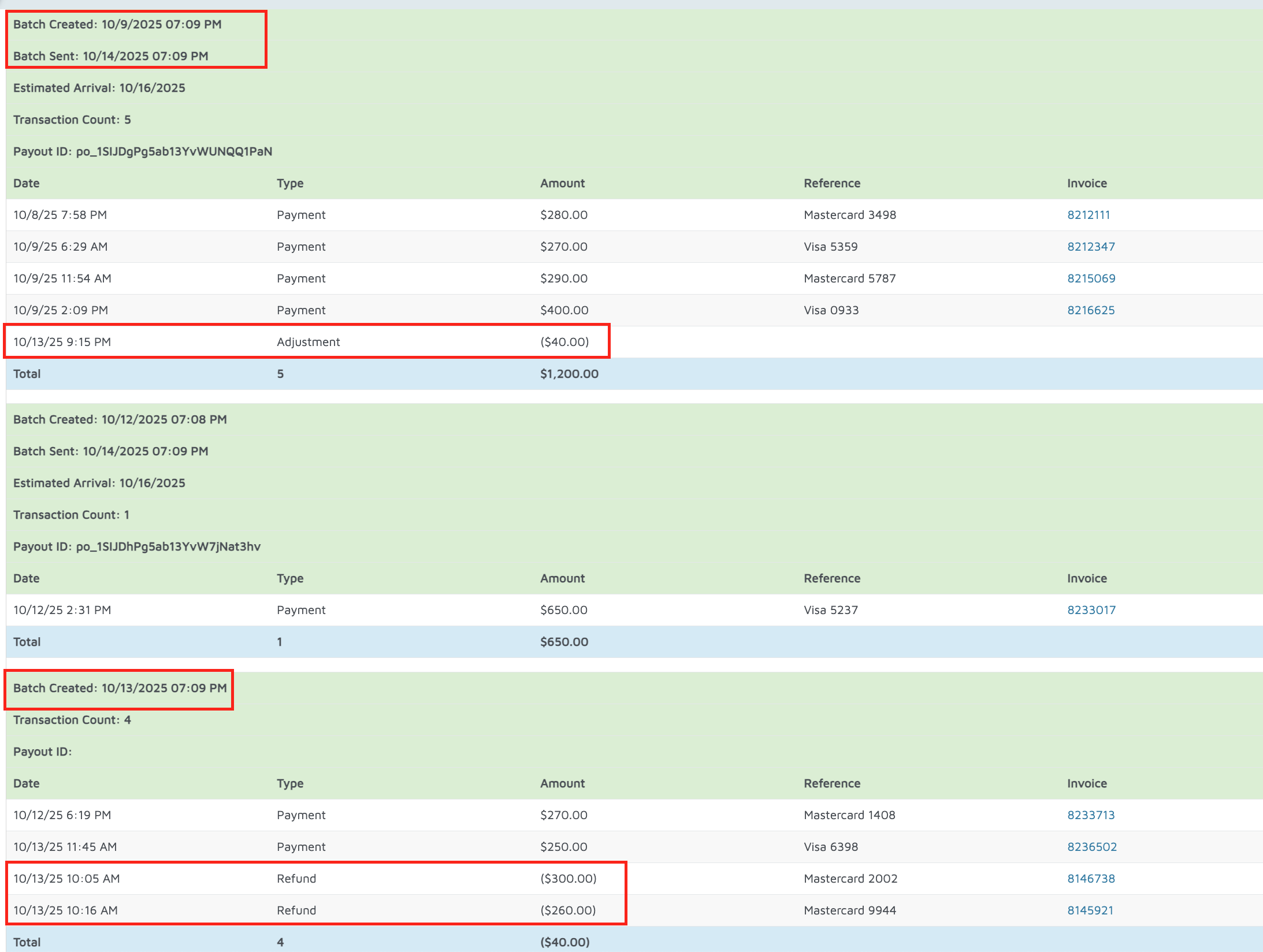
- Review the batch creation date and the batch sent date.
Molo evaluates all payments and refunds from the time the batch is created until the time the batch is sent. - Identify the adjustment timing:
- The batch in this example was created on the 9th and not sent until the 14th.
- This means Molo had the full window (9th–14th) to account for any refunds or payments.
- Locate the transaction that triggered the adjustment:
A refund was processed on the 13th, which fell inside the batch window. - Scroll to the batch created on the 13th to review the specific activity:
- A payment of $272 and a payment of $250 were taken.
- Total refund amounts resulted in Stripe funding $300 and $260.
- The difference results in an adjustment of $40.
- Understand why the adjustment occurs:
Since the refund happened on the 13th and the batch wasn’t finalized until the 14th, Molo still had time to correctly apply the $40 adjustment before the batch was submitted.
Did you find it helpful?
Yes
No
Send feedback Sorry we couldn't be helpful. Help us improve this article with your feedback.
