
- "Help! My boaters/customers are having trouble logging into their accounts."
When boaters report difficulty logging in to the Molo Customer Portal (MCP), a few quick checks usually resolve the issue. Use this guide to walk through the correct sequence and help your customers regain access quickly.
1. Confirm the Customer Is Using the Correct Login Link
This is the most common cause of login issues.
Boaters often use incorrect links, bookmarked pages, or URLs for a different location.
What to do:
- Locate your location-specific login link.
- Email the boater this link directly and ask them to use it when attempting to sign in.
- If they’re on a mobile device, ask them to tap the link to open it in their browser.
2. Confirm the Customer Is Using the Email Listed in Molo
This is the second most common cause of login problems.
Many boaters have multiple email addresses and may attempt to use one that isn’t associated with their MCP account.
What to do:
- Verify the email address listed on the boater’s Contact > Portal Access page.
- Ask them to try logging in using that exact email.
- If they want to use a different email going forward, the marina can make the change in Contact > Portal Access page.
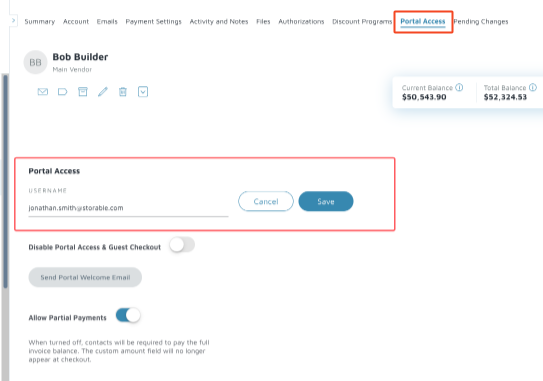
3. Have the Customer Try a Private/Incognito Window or Another Browser
Cached data or autofill can cause login pages to load incorrectly.
Ask the boater to try one of the following:
- Open a private/incognito window and try logging in
- Try logging in on a different browser
- Try logging in on a different device
If one of these methods works, the issue is likely cache-related.
4. Check for Common Typos or Formatting Issues
Before escalating:
- Make sure the email has no leading/trailing spaces
- Confirm the email is correctly formatted ([email protected])
- Ensure they are not pasting partial links or incomplete password reset URLs
5. Still Having Trouble? Contact Support
If the customer still cannot log in after all steps:
Please contact Storable Marine Support and include:
- Boater name
- Marina name
- Email address used
- Any error messages displayed
- Portal link used by the customer
- Which troubleshooting steps were attempted
- This helps Support diagnose and resolve the issue faster.