
- "How can I set a blanket discount for this work order invoice? I can't set a negative number."
Resolution Steps
- Create an Inventory Item called "Discount" (or whatever the user desires) with the following settings:
- Set the Sales Price to -$1.
- Set the Job Category to Charge.
- Set Price Type to Cash.
- Navigate to the Work Order > Joband add the Discount charge:
- Set the quantity as the desired dollar amount to discount (e.g. set quantity to 100 since -$1.00 x 100 = -$100).
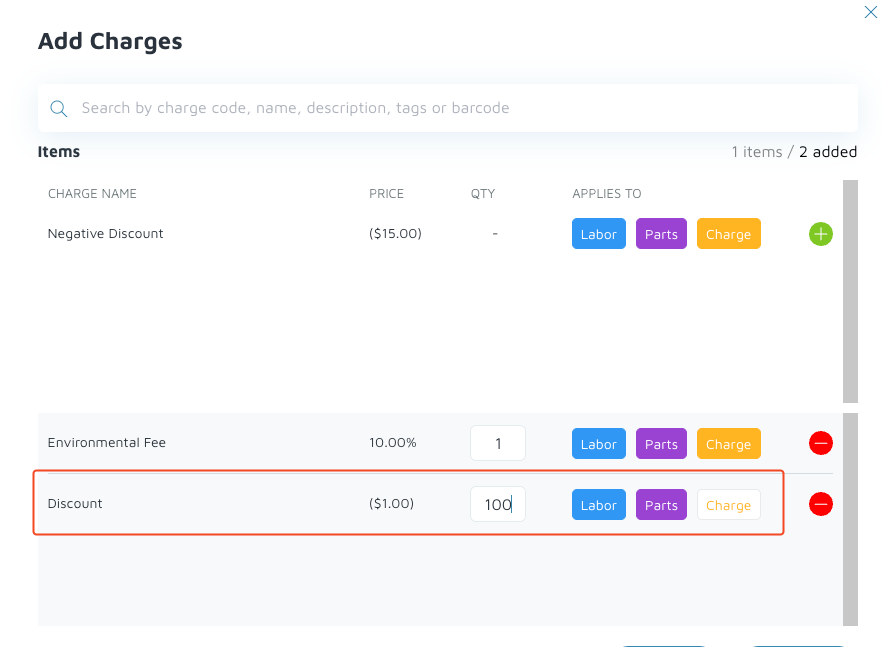
- Set the quantity as the desired dollar amount to discount (e.g. set quantity to 100 since -$1.00 x 100 = -$100).
Verification: The discount line should appear once the work order is invoiced.